helping your business use
technology effectively...


Website Delivery - Your Website - New
Services

To successfully build a website you need two things - structure and content. To capture these things cpnwork.com uses online forms.

Online Forms

Our online forms allow you to enter details online and then email the completed form back to us. Also, if you want to, you can save the form to your PC and then fill it in at your leisure.

How to Use Online Forms

Our online forms are in PDF format. Usually, a PDF document is one that can only be printed, but ours allow you to enter data directly into them. Once complete you can email the form to cpnwork for processing and quote production.

Recognising fields and checkboxes

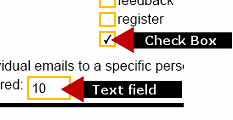
Each form contains instructions, fields and checkboxes. The image on the left details how you recognise both the checkboxes and fields.

To select a checkbox, click on it. A tick will appear. If you selected it in error, simply click on the checkbox again to remove the tick. For the fields, simply click on the field you'd like to enter text into and start typing. You can press the tab key to move forwards from field to field.


Start now!

Once you've completed the form, click on the 'Send Now' button. This will email your form to cpnwork.com for processing.

Once we've received and processed it, we'll be in contact with you for 'Step 2 - Defining Your Needs'.


© cpnwork.com
site map
privacy
disclaimer