|
 |
|
How does a firewall Work?
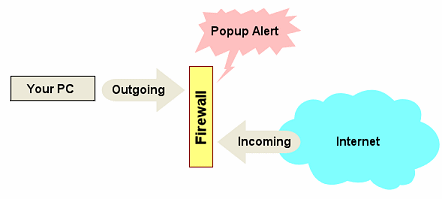
If, however, the firewall detected an unusual aspect to this page, such as a file download was initiated when this page was displayed, the firewall would detect it and display an alert. This is known as an incoming alert. Outgoing Alerts Sometimes the reverse happens; a software program on your computer initiates a request to access the Internet. These requests can be started by viruses or spyware and are particularly common in games where statistical data is recorded about your game usage. On a regular basis this data is sent back to the proprietor's website for analysis. This is known as an outgoing alert. What to do when an Alert Pops Up Firstly - don't panic! Regardless of the alert, you are given two options, to allow the transfer request or to deny it. A sub-option to any alert is the ability to decide what to do if a particular alert happens in the future. You can set the alert to always deny or allow the transfer. If you have not initiated any requests via the Internet, then it is a good idea that you specify the deny option. An outgoing request should be treated the same way. However, you should always check which software application requested the transfer. If it is your Antivirus, AntiSpyware, Internet Explorer or Email software, then you need to allow the request. Other Alerts Some firewalls watch the status of software programs that have been given permission to access the Internet. When a software program is changed, by a new or updated installation, the firewall may alert you to that change and re-request that an outgoing request be authorised. This activity is to be considered normal, but only if you've updated or re-installed the particular software. |